
 In diesem Artikel haben wir für Sie ein paar Variationen an Textfeldern mit CSS erstellt – nur um Anregungen zu geben. Das Kopieren des CSS-Codes ist erlaubt…
Variante 1:
Der obere Rahmen ist offen, links und rechts hat das Formular
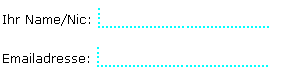
<style type="text/css">

              input

              {

              border: none;

              border-bottom: 2 dotted aqua;

              border-left: 2 dotted aqua;

              height: 18px;

              font-size: 13px;

              font-weight: bold;

              }


              </style>
Zunächst wird definiert, das das Element keinen Rahmen haben
soll. Die nächsten zwei CSS Anweisungen überschreiben
diese Anweisunge, jedoch nur für den Unteren (bottom), und
oberen Rahmen.
Variante 2:
Im Borrussia Dortmund Stil

<style type="text/css">

              input

              {

              border: 2 dotted yellow;

              background: black;

              height: 20px;

              width: 100px;

              color: yellow;

              font-size: 12px;

              font-weight: bold;

              }


              </style>
Variante 3a:
Hier bleiben die Seiten offen…
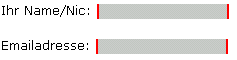
 <style type="text/css">

              input

              {

              border: none;

              border-left: 2 solid red;

              border-right: 2 solid red;

              background: #CCCCCC;

              color: red;

              font-size: 12px;

              font-weight: bold;

              }


              </style>
Variante 3b:
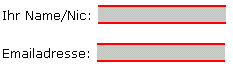
 <style type="text/css">

              input

              {

              border: none;

              border-top: 2 solid red;

              border-bottom: 2 solid red;

              background: #CCCCCC;

              color: red;

              font-size: 12px;

              font-weight: bold;

              }


              </style>
Variante 4:
Mit dem Rahmentyp inset, wird ein Verlauf von Blau nach schwarz
erreicht.
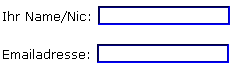
<style type="text/css">

              input

              {

              border: 2 inset blue;

              font-size: 12px;

              font-weight: bold;

              }


              </style>